
Overview
This package provides basic support functions for Building Blocks including easy access to language bundle values, configuration settings, navigation items, receipt messages and simple logging. An example Building Block (B2Context-demo) illustrating the use of this package is also provided.
For Building Blocks to be installed with the April 2014 release of Learn 9.1 (or later) it is essential that the 1.4.01 release (or later) of this package is used.
System requirements
The B2Context package is written for use with Building Blocks written for Learn 9.0 (or later). Note that the package uses the following classes which are not publicly supported by Blackboard:
- blackboard.data.ReceiptOptions
- blackboard.data.navigation.NavigationItem
- blackboard.data.registry.Registry
- blackboard.data.registry.UserRegistryEntry
- blackboard.persist.navigation.NavigationItemDbLoader
- blackboard.persist.registry.UserRegistryEntryDbLoader
- blackboard.persist.registry.UserRegistryEntryDbPersister
- blackboard.platform.intl.BbResourceBundle
- blackboard.platform.servlet.InlineReceiptUtil
- blackboard.portal.data.Module
Installation
The package should be included in the war file for any Building Block which makes use of it.
Specification
This package is comprised of a single published class which is described in the JavaDocs documentation. The methods defined provide access to the following functionality:
- contextual information
- configuration settings
- utility methods
Contextual information
These methods access properties from the Building Block, Blackboard context or the HTTP request.
Building Block properties
- getHandle() - get the handle for the Building Block
- getPath() - get the path for the current Building Block
- getPlugIn() - get the plugin object for the Building Block
- getResourceString() - get a resource string from the bundle for the current locale
- getResourceStrings() - get all the resource strings from the bundle for the current locale
- getServerUrl() - get the URL for the current Building Block
- getVendorId() - get the vendor ID for the Building Block
- getWebappRoot() - get the file root for the Building Block
The resource strings are extracted from the bb-manifest properties file for the current locale; for example, bb-manifest-en_GB.properties located in the WEB-INF/bundles directory.
Blackboard context
- getContext() - get the current Blackboard context object
- setContext() - set the current Blackboard context object (see below)
- getNavigationItem() - get a navigation item
- setReceipt() - set a receipt option
- setReceiptOptions() - set success and/or error receipts to a session or URL
Setting the context object is useful when creating a context from an incoming HTTP request. The Blackboard context object has methods for checking whether it contains a course, content or group context. These methods are used by the configuration settings methods (see below) to determine where to look for non-global settings. It is possible to override the context methods using the setIgnoreCourseContext, setIgnoreContentContext and setIgnoreGroupContext. For example, when calling the getSettings method from within a content handler, the non-global anonymous settings will be taken from the content area. However, if ignoreContentContext is set to true, the content context will be ignored and settings will be taken from the course context (just as if there was no current content context).
HTTP request
- getRequest() - get the current HTTP request object
- getRequestParameter() - gets a parameter from the HTTP request
- getRequestParameters() - gets the values of all parameters from the HTTP request
- getRequestParameterValues() - gets the value(s) for a parameter from the HTTP request
These methods provide support for specifying default values for missing request parameters and also for combining multiple values for a single parameter.
Configuration settings
- clearSettings() - delete all configuration settings
- getSaveEmptyValues() - get the SaveEmptyValues setting
- getSetting() - get a configuration setting value
- getSettings() - get a list of all configuration settings
- persistSettings() - permanently save the current configuration setting values
- setSaveEmptyValues() - set the SaveEmptyValues setting
- setSetting() - set a configuration setting value
These methods enable simple settings (name and value pairs) to be loaded and saved for use with a Building Block. The SaveEmptyValues setting determines whether empty strings are saved or whether the setting is removed. Settings are divided into four categories based on the values of global and anonymous:
| anonymous | |||
|---|---|---|---|
| true | false | ||
| global | true | 1. settings which apply across the whole of the Building Block | 2. settings for a specific user across the whole of the Building Block |
| false | 3. settings which apply to the current context (such as a course, group or content item) of a Building Block | 4. settings for a specific user within the current context of a Building Block | |
The settings for each category are saved in the following locations:
| anonymous | |||
|---|---|---|---|
| true | false | ||
| global | true | properties file in the config directory of the Building Block | Blackboard User Registry |
| false | properties file in the directory relating to the context (e.g. the ppg directory of a course) or, for modules, as Blackboard Custom Data | ||
Utility methods
- getEditMode() - gets the current status of edit mode (aways returns false for Learn 9.0)
- getVersionNumber() - gets the Blackboard version number (e.g. 9.0.505.0)
- getIsVersion() - checks whether the Blackboard version number is the version passed or later (for the April 2014 release, use a service pack number of "201404")
Usage
A Building Block (B2Context-demo) is available for download to illustrate how to make use of this package. The
examples used below are based on this Building Block.
Configuration settings
System settings
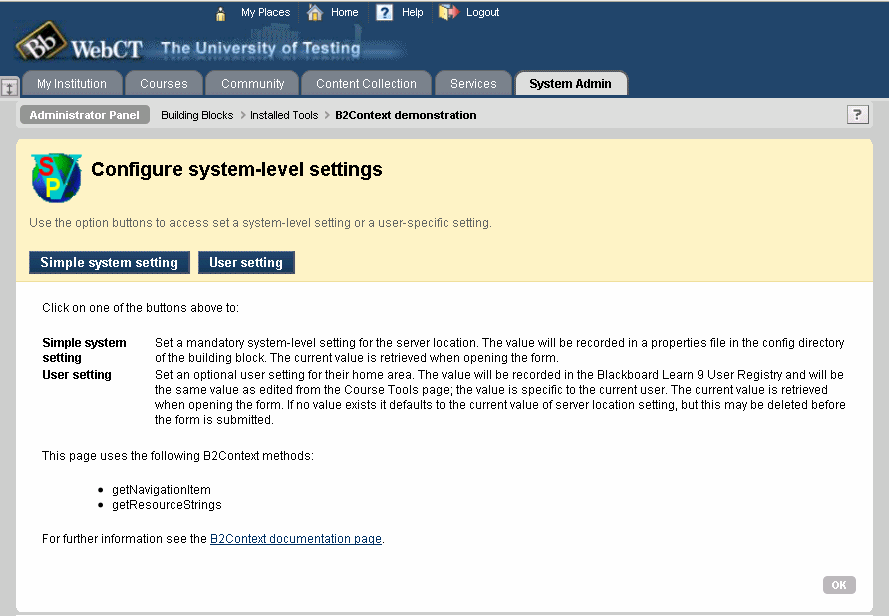
The following extract is from the system/simple.jsp file which displays a form containing a single mandatory text field and saves the value entered as a system-wide configuration setting:
...
<%
String LOCATION_FIELD_NAME = "location";
B2Context b2Context = new B2Context(request);
String cancelUrl = "index.jsp";
if (request.getMethod().equalsIgnoreCase("POST")) {
String location = b2Context.getRequestParameter(LOCATION_FIELD_NAME, "").trim();
b2Context.setSetting(LOCATION_FIELD_NAME, location);
b2Context.persistSettings();
response.sendRedirect(cancelUrl + "?inline_receipt_message=" +
b2Context.getResourceString("receipt.success"));
}
pageContext.setAttribute("bundle", b2Context.getResourceStrings());
pageContext.setAttribute("cancelUrl", cancelUrl);
%>
<bbNG:pageHeader instructions="${bundle['page.system.simple.instructions']}">
<bbNG:breadcrumbBar environment="SYS_ADMIN_PANEL" navItem="admin_plugin_manage">
<bbNG:breadcrumb href="index.jsp" title="${bundle['plugin.name']}" />
<bbNG:breadcrumb title="${bundle['page.system.simple.title']}" />
</bbNG:breadcrumbBar>
<bbNG:pageTitleBar iconUrl="../images/spvsp.gif" showTitleBar="true" title="${bundle['page.system.simple.title']}"/>
</bbNG:pageHeader>
<bbNG:form action="" id="id_simpleForm" name="simpleForm" method="post" onsubmit="return validateForm();">
<bbNG:dataCollection markUnsavedChanges="true" showSubmitButtons="true">
<bbNG:step hideNumber="false" id="stepOne" title="${bundle['page.system.simple.step1.title']}" instructions="${bundle['page.system.simple.step1.instructions']}">
<bbNG:dataElement isRequired="true" label="${bundle['page.system.simple.step1.location.label']}">
<bbNG:textElement name="<%=LOCATION_FIELD_NAME%>" value="<%=b2Context.getSetting(LOCATION_FIELD_NAME)%>" helpText="${bundle['page.system.simple.step1.location.instructions']}" size="30" minLength="1" />
</bbNG:dataElement>
</bbNG:step>
<bbNG:stepSubmit hideNumber="false" showCancelButton="true" cancelUrl="${cancelUrl}" />
</bbNG:dataCollection>
</bbNG:form>
...
An instance of the B2Context class is created:
B2Context b2Context = new B2Context(request);
The value of the form field submitted can be extracted with a default value of an empty string:
String location = b2Context.getRequestParameter(LOCATION_FIELD_NAME, "");
The value submitted can be saved (in memory) as a system configuration setting (i.e. global and anonymous):
b2Context.setSetting(LOCATION_FIELD_NAME, location);
which is equivalent to:
b2Context.setSetting(true, true, LOCATION_FIELD_NAME, location);
To save the settings permanently:
b2Context.persistSettings();
A string from a resource bundle can be obtained by name:
String message = b2Context.getResourceString("receipt.success");
or all resource strings can be saved in a Map:
Map<String,String> messages = b2Context.getResourceStrings();
The value of a system configuration setting can be accessed:
String value = b2Context.getSetting(LOCATION_FIELD_NAME);
which may also be given a default value to use when the setting does not already exist:
String value = b2Context.getSetting(true, true, LOCATION_FIELD_NAME, "My default");
User settings
The system/user.jsp file displays a form containing a single optional
text field and saves the value entered as a user-specific setting.
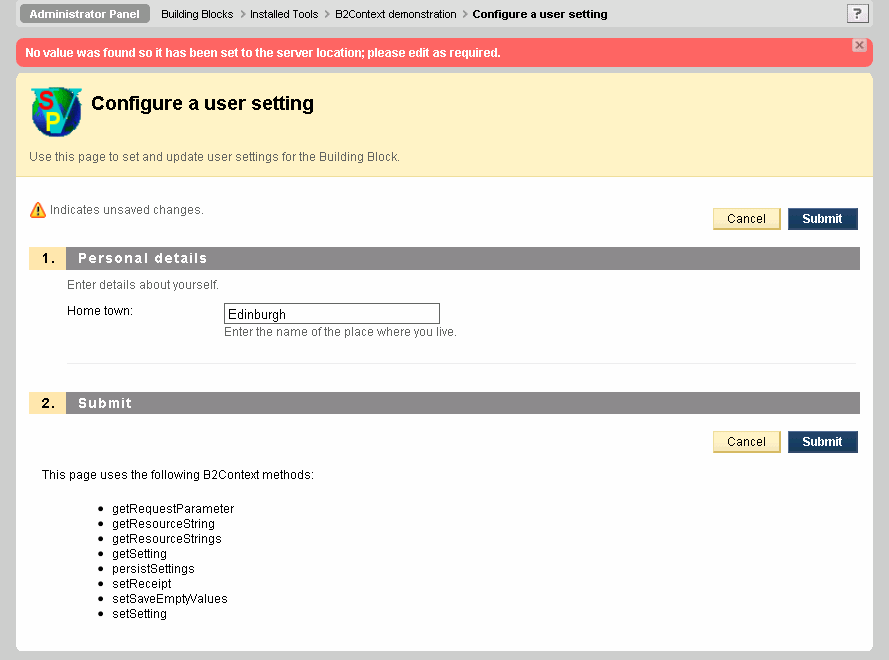
Because the setting is optional and a
default is used when no value exists, it is convenient not to save empty strings:
b2Context.setSaveEmptyValues(false);
The anonymous parameter is set to false to denote that the setting is specific to the user:
b2Context.setSetting(true, false, HOME_FIELD_NAME, location);
When persisting the settings remember to specify the same category:
b2Context.persistSettings(true, false);
If no value exists for a setting then it is set to the value of the system configuration setting and a receipt displayed on the page to inform the user:
if (b2Context.getSetting(true, false, HOME_FIELD_NAME).length() <= 0) {
b2Context.setSetting(true, false, HOME_FIELD_NAME,
b2Context.getSetting(LOCATION_FIELD_NAME));
b2Context.setReceipt(b2Context.getResourceString("system.user.default"), false);
}
Course settings
The course/simple.jsp file displays a form containing a single optional text field and saves the value entered as a course-specific setting. Set the global parameter to false to denote that the setting is specific to the context:
b2Context.setSetting(false, true, LOCATION_FIELD_NAME, location);
...
b2Context.persistSettings(false, true);
...
String value = b2Context.getSetting(false, true, LOCATION_FIELD_NAME);
Contextual information
The B2Context package provides methods to obtain information about the Building Block. For example, the vendorID and the handle specified in the bb-manifest.xml file:
String vendorID = b2Context.getVendorId();
String handle = b2Context.getHandle();
The URL for the root of the Building Block can be consructed by combining the server URL and the path:
String rootUrl = b2Context.getServerUrl() + b2Context.getPath();
The location of this root directory in the file system can be obtained by:
String rootDir = b2Context.getWebappRoot();
Navigation items provide details of the location for specific areas within Learn 9; for example, to obtain the URL for the Installed Blocks page on the System Admin tab:
String url = b2Context.getNavigationItem("admin_plugin_manage").getHref();
The names of navigation items can be found from the internal_handle column of the navigation_item table.
Version history
| Version | Date | Description |
|---|---|---|
| 1.0.05 | 11-Oct-2010 | Initial release |
| 1.1.00 | 19-Jan-2012 |
Added setContext, setReceiptOptions, getVersionNumber and getEditMode methods Added error checking to request parameter methods Added override options to hasCourseContext, hasContentContext and hasGroupContext methods of context object |
| 1.2.00 | 2-Sep-2012 |
Changed release to GNU Lesser General Public License Added addReceiptOptionsToRequest method to provide support for warning messages Invalidated all settings when context changes |
| 1.3.00 | 5-Nov-2012 |
Added getVersionNumber method returning an integer array Added getIsVersion method to check for a specific release Deleted settings for a module are now removed rather than just emptied Updated setReceiptOptions to support 9.1 SP10 |
| 1.4.00 | 24-Feb-2014 |
Added support for saving global anonymous settings against a node in the Institutional Hierarchy (requires 9.1SP8+) Allow instance to be created with a null Request object Added simple logging methods: setLogDebug ang log |
| 1.4.01 | 18-Jun-2014 | Added support for Learn 9.1 April 2014 release - this release is required for April 2014 release, or later. |
| 1.4.02 | 8-Sep-2014 | Fixed bug with failure to reinitialise the node after changing the context |
| 1.5.00 | 16-Oct-2014 | Added getSchema, getPath(String), getLogDebug, getB2Version and getIsB2Version methods (see JavaDocs for details) |
| 1.5.01 | 1-Jan-2015 | Fixed bug in getPath(String) method |
| 1.6.00 | 24-May-2015 |
Fixed bug with persistSettings(global, anonymous, suffix, settings) method Added unfiltered option to getRequest and getRequestParameter methods |
| 1.6.01 | 12-Nov-2015 | Fixed bug with persisting the debug mode setting |
| 1.7.00 | 29-Feb-16 | Added constructor using a context object (so new B2Context(null); constructor should now be coded as new B2Context();) |
| 1.8.00 | 14-Feb-18 |
Remove dependency on Blackboard context object Use log file in plugins log directory Fix bug with saving group settings |
| 1.9.00 | 22-Apr-18 |
Removed hard-coded file separator characters Added log methods for error messages and objects Log messages written to System.err if unable to access plugin log file Added getSettings method for node only settings Fixed bug when deleting empty properties files Fixed bug with getSchema() when B2 running from cache directory Added code to migrate old group settings files |
| 1.9.01 | 11-Dec-20 |
Add check for no groups in processCourseExport Ensure all version numbers have 4 elements |
| 1.9.02 | 18-Jun-22 | Add check for no groups in processCourseImport |
Licence
 This work is written by Stephen Vickers and is released under a
GNU Lesser General Public Licence.
The B2Context package can be downloaded from OSCELOT. The source files are available from the ceLTIc Project repository, where any issues should be reported.
This work is written by Stephen Vickers and is released under a
GNU Lesser General Public Licence.
The B2Context package can be downloaded from OSCELOT. The source files are available from the ceLTIc Project repository, where any issues should be reported.
